

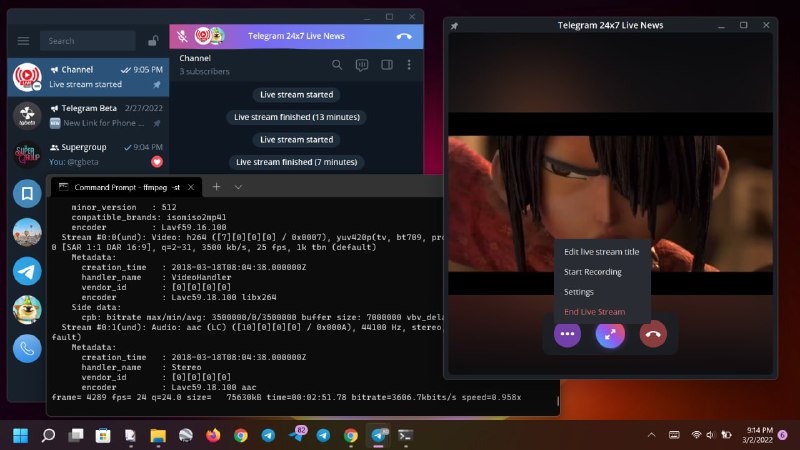
🔥 RTMP Live StreamManage Live Streams in your groups and channels using external software like OBS Studio, XSplit Broadcaster, or FFmpeg.Notes:• With external software, you can stream from many sources: desktop or window screen, video file, etc.• FFmpeg: Documentation, Encoding for streaming sites• You can now Start RTMP Live Stream in production server: open a group/channel as owner > click Live Stream button > Stream With.• Check @avformat for sample video files (AVC, HEVC, AV1, etc)Try these parameters to stream video files with FFmpeg• RTMP for any video codec:ffmpeg -stream_loop -1 -re -i "movie.mkv" -c:v libx264 -preset veryfast -b:v 3500k -maxrate 3500k -bufsize 7000k -pix_fmt yuv420p -g 50 -c:a aac -b:a 160k -ac 2 -ar 44100 -f flv rtmps://dc2t.rtmp.t.me/s/10909994:xxxxx

  1. 🔥 RTMP Live Stream

    Manage Live Streams in your groups and channels using external software like OBS Studio, XSplit Broadcaster, or FFmpeg.

    Notes:
    • With external software, you can stream from many sources: desktop or window screen, video file, etc.
    • FFmpeg: Documentation, Encoding for streaming sites
    • You can now Start RTMP Live Stream in production server: open a group/channel as owner > click Live Stream button > Stream With.
    • Check @avformat for sample video files (AVC, HEVC, AV1, etc)

    Try these parameters to stream video files with FFmpeg
    • RTMP for any video codec:
    ffmpeg -stream_loop -1 -re -i "movie.mkv" -c:v libx264 -preset veryfast -b:v 3500k -maxrate 3500k -bufsize 7000k -pix_fmt yuv420p -g 50 -c:a aac -b:a 160k -ac 2 -ar 44100 -f flv rtmps://dc2t.rtmp.t.me/s/10909994:xxxxx
    
    
    • RTMP for AVC/H.264 video:
    ffmpeg -stream_loop -1 -re -i "video.mp4" -c:v copy -c:a aac -ar 44100 -ac 1 -f flv rtmps://dc2t.rtmp.t.me/s/10909994:xxxxx
    
    
    @Telegram #beta #tdesktop v3.5.3+